
Download Ms Finance – Secure, Free Finance Software for Mac
Overview
Ms Finance is a full‑version finance management program designed exclusively for macOS. Developed by Earl Bryner, this English‑language application combines robust accounting tools with an intuitive user interface, making it ideal for freelancers, small businesses, and anyone who wants to keep personal finances under control. Unlike many fragmented budgeting apps, Ms Finance delivers an all‑in‑one solution that handles invoicing, expense tracking, tax calculations, and financial reporting without requiring additional plug‑ins or cloud subscriptions. The software is positioned as a free, secure alternative to premium finance suites, offering regular updates that keep the tax tables and currency rates current. Whether you are reconciling bank statements, generating profit‑and‑loss statements, or simply monitoring daily cash flow, Ms Finance provides the depth of features you’d expect from a professional accounting tool while preserving the simplicity that Mac users appreciate.
Core Features
- Comprehensive Invoicing: Create, customize, and send invoices directly from the app. Built‑in templates support recurring billing and automatic tax calculations.
- Expense Tracking & Receipts: Snap photos of receipts or import CSV files; the software categorizes expenses using AI‑assisted rules.
- Bank Reconciliation: Sync with major banks via OFX or manually import statements. Reconcile transactions with a drag‑and‑drop interface.
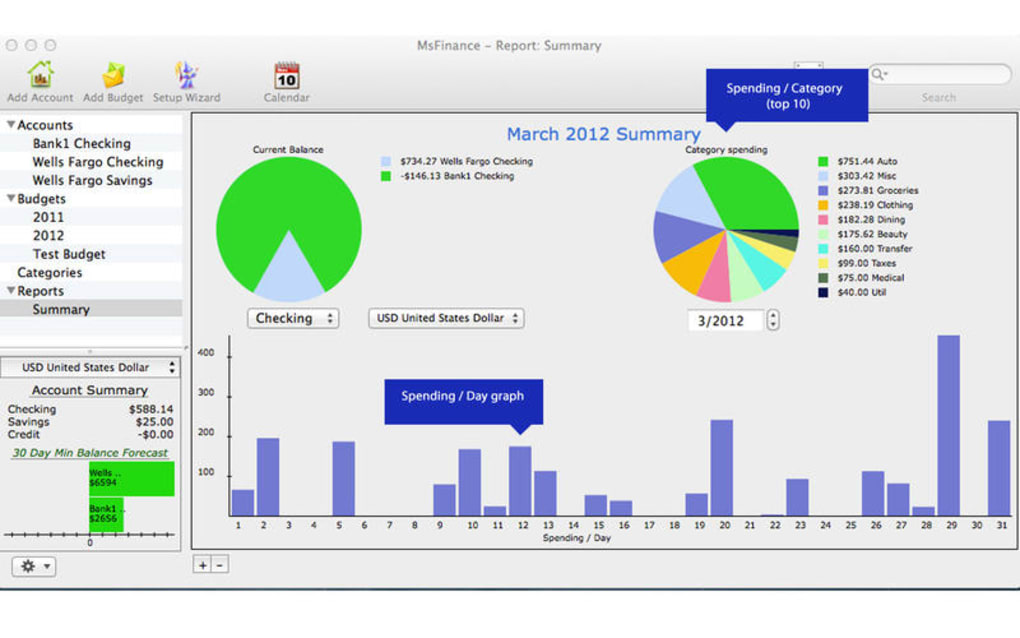
- Financial Reporting: Generate profit‑and‑loss, balance sheet, cash‑flow, and tax summary reports in PDF or Excel formats.
- Multi‑Currency Support: Real‑time exchange rates are applied automatically, making it easy to manage international clients.
- Secure Data Storage: All data is stored locally with optional AES‑256 encryption; backups can be scheduled to iCloud or external drives.
- Automation & Scheduling: Set recurring payments, automated reminders for overdue invoices, and scheduled financial snapshots.
- Customizable Dashboards: Drag‑and‑drop widgets let you monitor key metrics like cash balance, upcoming expenses, and revenue trends.
Installation & Daily Use
Step‑by‑Step Installation
Downloading Ms Finance is straightforward. Visit the official website, click the Download for Mac button, and the installer package (.dmg) will begin downloading. Once the file is on your desktop, double‑click to mount the image, then drag the Ms Finance icon into the /Applications folder. macOS may prompt you to confirm that the app is from an identified developer; click Open to proceed. The first launch will guide you through a brief wizard where you set your default currency, fiscal year, and whether you prefer local or cloud backups. Because the program is free, there is no activation key required, but you can register an optional account to receive automatic update notifications.
First‑Time Configuration
After installation, Ms Finance presents a clean dashboard with three primary tabs: Dashboard, Transactions, and Reports. The onboarding wizard asks you to import existing data—either from a CSV export of another accounting system or directly from your bank via OFX. If you have no prior data, you can start with a blank ledger and add your first client or vendor manually. The software automatically creates default expense categories (e.g., Office Supplies, Travel, Utilities) which you can edit to match your business needs.
Daily Workflow Tips
For efficient daily use, many users adopt the “record‑as‑you‑spend” habit. Use the quick‑add button in the Transactions tab to log cash purchases or credit‑card charges on the fly. The AI categorization engine learns from your edits, reducing the time spent on manual tagging.
Invoices can be generated from the Clients section; simply select a client, choose a template, and hit Send. The app integrates with the native Mail client on macOS, ensuring your invoices land in the recipient’s inbox without extra configuration. At month‑end, click the Reports tab to produce a profit‑and‑loss statement with a single click, then export it to PDF for your accountant.
Compatibility, System Requirements, Pros & Cons
Supported Operating Systems: macOS 10.15 (Catalina) and later. The app is optimized for both Intel‑based Macs and Apple Silicon (M1/M2) devices, delivering native performance without the need for Rosetta translation.
System Requirements
- Processor: 1.4 GHz dual‑core (Intel) or Apple M1 chip
- Memory: Minimum 4 GB RAM (8 GB recommended for large data sets)
- Storage: 200 MB free disk space for the application; additional space for backups
- Resolution: 1280 × 800 screen minimum
Pros
- Completely free with no hidden subscription fees.
- Native macOS design that feels familiar to Apple users.
- Robust feature set that rivals paid alternatives.
- Strong data security with optional encryption.
- Regular updates that keep tax tables current.
Cons
- No native Windows or Linux version (Mac‑only).
- Limited third‑party integrations compared with cloud‑based platforms.
- Learning curve for advanced reporting features.
- Customer support is community‑driven rather than 24/7 live chat.
FAQ
-
Is Ms Finance truly free, or are there hidden costs?
Ms Finance is offered as a free download with full functionality. There are no hidden subscription fees, and optional cloud backup services are provided through third‑party providers at the user’s discretion.
-
Can I migrate data from QuickBooks or Xero into Ms Finance?
Yes. Ms Finance supports CSV import, and both QuickBooks and Xero allow you to export data in CSV format. The import wizard will map fields automatically, but you can adjust column assignments during the process.
-
Is my financial data encrypted?
Ms Finance stores data locally on your Mac. You can enable AES‑256 encryption within the preferences panel, ensuring that all files are protected with a master password.
-
How often are updates released?
The development team releases minor updates monthly for bug fixes and security patches, and major feature updates every 6‑8 months. Users receive a notification within the app when a new version is available.
-
Can I use Ms Finance on multiple Macs with the same license?
Since Ms Finance is free and does not require a license key, you can install it on any number of Macs you own. However, each installation maintains its own local database unless you manually sync backups across devices.
Conclusion & Call to Action
Ms Finance stands out as a powerful, free finance application that respects the Mac ecosystem. Its comprehensive invoicing, expense tracking, and reporting capabilities make it a worthy contender for anyone looking to replace costly accounting software without sacrificing functionality. While the lack of Windows support and limited third‑party integrations may be a drawback for mixed‑environment teams, the native performance, strong security, and zero‑cost model more than compensate for these gaps. If you’re ready to bring order to your finances, download Ms Finance today and experience a seamless, secure, and fully featured accounting solution designed specifically for macOS.
Click here to download Ms Finance now and start managing your money with confidence.







